
Emulate Mali on QEMU
Intro
mali 나 adreno 같은 경우는 기존에 에뮬레이팅을 할 수가 없어서 실기기에서 직접 커널 디버깅을 하는 방법을 찾고 있었다.
근데 그 중에 다음과 같은 글에서 Mali 는 에뮬레이팅을 할 수 있다는 정보를 얻었다.
따라서 나도 x86 환경에서 Mali GPU 드라이버를 에뮬레이팅 해보기로 했다.
Download Mali source
mali 는 오픈소스 형태로 드라이버 소스 코드를 배포한다. 나는 여기에서 BX304L01B-SW-99002-r38p0-01eac0 버전의 Mali GPU driver 소스코드를 가져왔다.
다운받은 파일의 압축을 풀어보면 소스의 구조는 다음과 같다.
BX304L01B-SW-99002-r38p0-01eac0/
└── product
    └── kernel
        ├── build.bp
        ├── Documentation
        │   ├── ABI
        │   │   └── testing
        │   ├── devicetree
        │   │   └── bindings
        │   └── dma-buf-test-exporter.txt
        ├── drivers
        │   ├── base
        │   │   └── arm
        │   └── gpu
        │       └── arm
        ├── include
        │   ├── linux
        │   │   ├── dma-buf-test-exporter.h
        │   │   ├── memory_group_manager.h
        │   │   ├── priority_control_manager.h
        │   │   ├── protected_memory_allocator.h
        │   │   ├── protected_mode_switcher.h
        │   │   └── version_compat_defs.h
        │   └── uapi
        │       └── gpu
        ├── license.txt
        └── Mconfig
Download Kernel Source
그리고 Mali 를 구동시킬 리눅스 커널이 필요하다.
나는 기존에 잘 사용하던 5.13.18 버전의 linux kernel 소스를 가져왔다.
Import driver code to kernel
커널 코드에 드라이버를 합칠 부분은 총 3곳이다.
- kernel driver source
- Kconfig
- Makefile
차례대로 코드를 합쳐보자
1. copy kernel driver source
먼저 커널 소스의 drivers/gpu에 드라이버 소스 products/kernel/drivers/gpu/arm 디렉토리를 복사한다.
cp -r mali/source/directory/products/kernel/drivers/gpu/arm /kernel/source/directory/drivers/gpu
그 후 커널 소스의 include/linux 에 드라이버 소스 products/kernel/include/linux 의 소스를 모두 복사해준다.
cp mali/source/directory/products/kernel/include/linux/* /kernel/source/directory/include/linux
마지막으로 커널 소스의 include/uapi/gpu 디렉토리에 products/kernel/include/uapi/gpu/arm 디렉토리를 복사한다.
cp -r mali/source/directory/products/kernel/include/uapi/gpu/arm /kernel/source/directory/include/uapi/gpu
2. Modify drivers Kconfig
drivers/Kconfig 파일에 다음과 같은 줄을 추가해서 drivers 설정에 mali 컴파일 설정을 추가해준다.
source "drivers/gpu/arm/midgard/Kconfig"
3. Modify gpu driver Makefile
drivers/gpu/Makefile 에 다음과 같은 줄을 추가해 줘 빌드 목록에 추가해준다.
obj-y += arm/midgard/
Build config
이후 make menuconfig를 통해 커널 빌드 설정을 하면 Device Drivers 설정에 Mali Midgard series support 옵션이 생긴다.
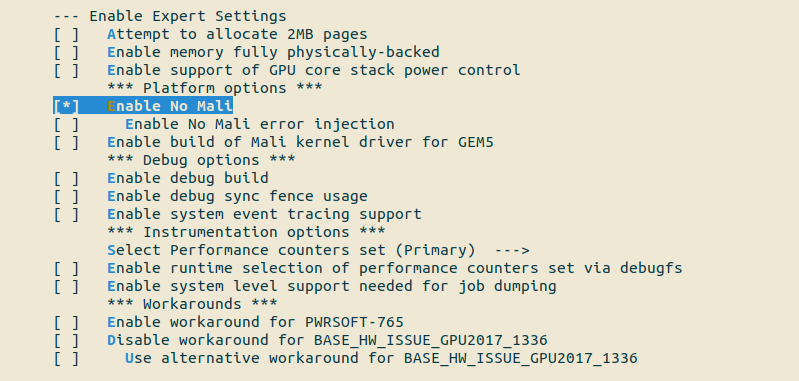
나는 그 중에 에뮬레이팅을 위해 Mali GPU 가 없는 환경에서 구동가능하게 해주는 설정인 CONFIG_MALI_NO_MALI를 설정해 주었다.
menuconfig 에서 설정해주는 방법은 mali 빌드 설정에서 Enable Expert Settings --> Enable No Mali 옵션을 활성화 해주면 된다.
Fix header source
이 상태로 커널을 빌드하면 asm/arch_timer.h 헤더파일이 없다는 빌드 에러가 뜬다. 해당 헤더파일은 소스 안에서 쓰이지 않으니 그냥 주석처리 해주면 된다.
drivers/gpu/arm/midgard/platform/devicetree/mali_kbase_config_platform.c 파일의 코드를 다음과 같이 주석처리 한다.
#include <mali_kbase.h>
#include <mali_kbase_defs.h>
#include <mali_kbase_config.h>
#include "mali_kbase_config_platform.h"
#include <device/mali_kbase_device.h>
#include <mali_kbase_hwaccess_time.h>
#include <gpu/mali_kbase_gpu_regmap.h>

#include <linux/kthread.h>
#include <linux/timer.h>
#include <linux/jiffies.h>
#include <linux/wait.h>
#include <linux/delay.h>
#include <linux/gcd.h>
//#include <asm/arch_timer.h>

struct kbase_platform_funcs_conf platform_funcs = {
	.platform_init_func = NULL,
	.platform_term_func = NULL,
	.platform_late_init_func = NULL,
	.platform_late_term_func = NULL,
};
Fix kbase_driver_init function
이렇게 구성하고 커널을 빌드하면 커널이 빌드된다. 커널을 구동한 후 심볼도 확인하면 mali gpu 드라이버 심볼도 확인가능하다.
~ # cat /proc/kallsyms | grep kbase_driver_init
ffffffff82d0e873 t kbase_driver_init
ffffffff82f065f0 d __initcall__kmod_mali_kbase__788_5707_kbase_driver_init6
하지만 /dev 디렉토리에 mali0 라는 이름을 가졌어야 할 디바이스 파일이 생성되지 않는 것을 볼 수 있다.
디버깅과 자료 조사를 통해 알아냈는데, 이는 내가 가지고 있는 드라이버가 platform_driver 만 추가해줬을 뿐, platform_device 는 추가해 주지 않기 때문이라는 것을 알았다.
따라서 platform_device 를 추가해주는 소스를 추가해서 다시 빌드해줬다.
- drivers/gpu/arm/midgard/mali_kbase_core_linux.c ```c
static struct platform_device kbase_platform_device_cus = { // add platform_device define .name = kbase_drv_name, };
/*
- The driver will not provide a shortcut to create the Mali platform device
- anymore when using Device Tree. */ #if IS_ENABLED(CONFIG_OF) module_platform_driver(kbase_platform_driver); #else
static int __init kbase_driver_init(void) { int ret;
ret = kbase_platform_register();
if (ret)
	return ret;

ret = platform_driver_register(&kbase_platform_driver);

platform_device_register(&kbase_platform_device_cus); //add platform_device

if (ret)
	kbase_platform_unregister();

return ret; } ... #endif ```
그럼 다음과 같이 mali 디바이스에 접근할 수 있는 것을 볼 수 있다.
~ # ls -al /dev | grep mali
crw-rw----    1 0        0          10, 125 Feb  5 09:42 mali0
Conclusion
이제 mali 를 x86_64 환경에서 에뮬레이팅 할 수 있게 되었다! 물론 mali 의 모든 기능을 에뮬레이팅 시키는 것에는 무리가 있겠지만, 지금까지 나온 원데이들을 편하게 디버깅 하면서 실험해 볼 수 있을것이다.