
RAG - review deepwiki-open
RAG
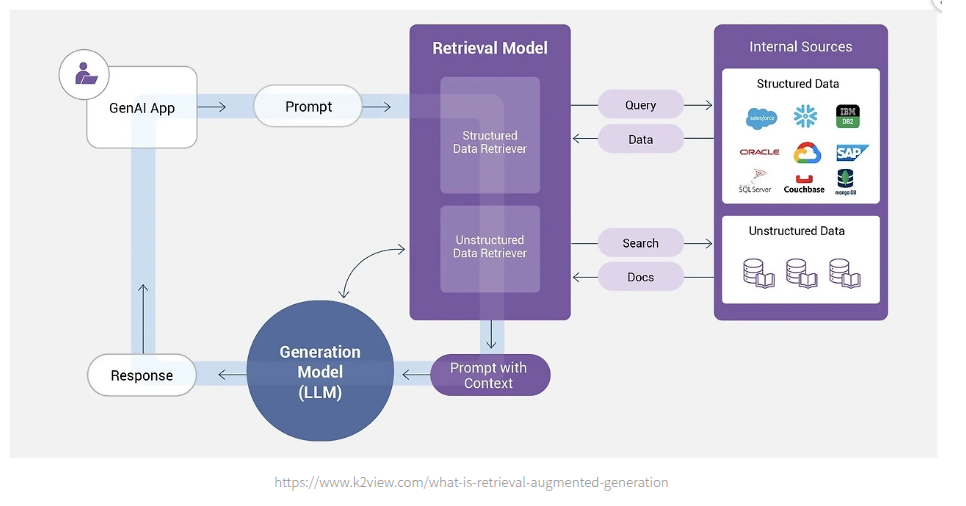
RAG(Retrieval-Augmented Generation)란 LLM이 답변을 생성할때, 외부 지식 데이터베이스에서 관련 정보를 먼저 검색한 뒤 그 내용을 이용해 답변을 생성하는 기술로, 모델의 할루시네이션 등을 최소화 하고 새로운 지식 정보를 빠르게 모델에 적용할 수 있는 특징이 있다.
Workflow
RAG 의 구조는 크게 두가지로 나뉜다.
- Retriever: 질문과 관련된 유사한 정보를 데이터베이스에서 검색하여 찾아온다.
- 데이터베이스는 보통 VectorDB 를 사용하며, 사용자가 질문시에 질문과 유사한 벡터값을 가진 데이터들을 DB 에서 가져온다.
- Generator: 찾아온 정보를 바탕으로 LLM이 답변을 생성한다.
Case Study: deepwiki-open
글로만 이해하기에는 와닿지 않아서 RAG 를 사용하는 하나의 예제를 가지고와 분석을 해봤다.
대상 프로젝트는 deepwiki-open 으로, 특정 레포의 소스코드를 RAG 를 이용해 분석할 수 있게 해주는 프레임워크이다.
해당 프로젝트의에 대한 자세한 설명은 README.md 에 잘 나와있으니 참고하자.
해당 프로젝트에서의 rag 관련 코드는 api/rag.py 에, 임베딩을 위한 코드는 api/data_pipeline.py 에 구현되어있다.
Embedding codebase
먼저 레포를 지정하면 레포에서 코드베이스를 다운로드 받고, 그 코드베이스를 임베딩한다.
deepwiki 는 adalflow 를 사용해서 임베딩을 생성하고, 사용하는 기본 모델은 ollama 를 썼다.
- api/data_pipeline.py ```python from adalflow.core.types import Document, List from adalflow.components.data_process import TextSplitter, ToEmbeddings
…
from adalflow.utils import get_adalflow_default_root_path from adalflow.core.db import LocalDB from api.ollama_patch import OllamaDocumentProcessor
- api/data_pipeline.py
```python
for ext in doc_extensions:
    files = glob.glob(f"{path}/**/*{ext}", recursive=True)
    for file_path in files:
        # Check if file should be processed based on inclusion/exclusion rules
        if not should_process_file(file_path, use_inclusion_mode, included_dirs, included_files, excluded_dirs, excluded_files):
            continue

        try:
            with open(file_path, "r", encoding="utf-8") as f:
                content = f.read()
                relative_path = os.path.relpath(file_path, path)

                # Check token count
                token_count = count_tokens(content, embedder_type)
                if token_count > MAX_EMBEDDING_TOKENS:
                    logger.warning(f"Skipping large file {relative_path}: Token count ({token_count}) exceeds limit")
                    continue

                doc = Document(
                    text=content,
                    meta_data={
                        "file_path": relative_path,
                        "type": ext[1:],
                        "is_code": False,
                        "is_implementation": False,
                        "title": relative_path,
                        "token_count": token_count,
                    },
                )
                documents.append(doc)
        except Exception as e:
            logger.error(f"Error reading {file_path}: {e}")
여기서 Document는 adalflow 의 데이터 구조체이다.
그리고 사용자 지정 / default 임베딩 모델 / text spliter 를 지정하여 하나의 pipeline 을 구축한다 .
- api/data_pipeline.py
def prepare_data_pipeline(embedder_type: str = None, is_ollama_embedder: bool = None):
    """
    Creates and returns the data transformation pipeline.

    Args:
        embedder_type (str, optional): The embedder type ('openai', 'google', 'ollama').
                                     If None, will be determined from configuration.
        is_ollama_embedder (bool, optional): DEPRECATED. Use embedder_type instead.
                                           If None, will be determined from configuration.

    Returns:
        adal.Sequential: The data transformation pipeline
    """
    from api.config import get_embedder_config, get_embedder_type

    # Handle backward compatibility
    if embedder_type is None and is_ollama_embedder is not None:
        embedder_type = 'ollama' if is_ollama_embedder else None

    # Determine embedder type if not specified
    if embedder_type is None:
        embedder_type = get_embedder_type()

    splitter = TextSplitter(**configs["text_splitter"])
    embedder_config = get_embedder_config()

    embedder = get_embedder(embedder_type=embedder_type)

    # Choose appropriate processor based on embedder type
    if embedder_type == 'ollama':
        # Use Ollama document processor for single-document processing
        embedder_transformer = OllamaDocumentProcessor(embedder=embedder)
    else:
        # Use batch processing for OpenAI and Google embedders
        batch_size = embedder_config.get("batch_size", 500)
        embedder_transformer = ToEmbeddings(
            embedder=embedder, batch_size=batch_size
        )

    data_transformer = adal.Sequential(
        splitter, embedder_transformer
    )  # sequential will chain together splitter and embedder
    return data_transformer
그후 해당 파이프라인들을 이용해 코드들을 임베딩한 후 로컬 db 로 저장한다.
- api/data_pipeline.py
def transform_documents_and_save_to_db(
  documents: List[Document], db_path: str, embedder_type: str = None, is_ollama_embedder: bool = None
) -> LocalDB:
  """
  Transforms a list of documents and saves them to a local database.

  Args:
      documents (list): A list of `Document` objects.
      db_path (str): The path to the local database file.
      embedder_type (str, optional): The embedder type ('openai', 'google', 'ollama').
                                   If None, will be determined from configuration.
      is_ollama_embedder (bool, optional): DEPRECATED. Use embedder_type instead.
                                         If None, will be determined from configuration.
  """
  # Get the data transformer
  data_transformer = prepare_data_pipeline(embedder_type, is_ollama_embedder)

  # Save the documents to a local database
  db = LocalDB()
  db.register_transformer(transformer=data_transformer, key="split_and_embed")
  db.load(documents)
  db.transform(key="split_and_embed")
  os.makedirs(os.path.dirname(db_path), exist_ok=True)
  db.save_state(filepath=db_path)
  return db
Retrieve
이제 생성한 db 를 어떻게 이용하는지 살펴보자.
deepwiki 는 이미 존재하는 retriever 를 사용하는데, FAISS 를 사용한다 .
from adalflow.components.retriever.faiss_retriever import FAISSRetriever
RAG 객체가 로드될때, conversation 에 사용될 memory. model, 과 같은 정보들을 초기화 하고, 데이터베이스에서 FAISS 가 검색을 할때 오류가 나지 않도록 임베딩된 document 들을 정리하는 과정 등을 거친다.
    def prepare_retriever(self, repo_url_or_path: str, type: str = "github", access_token: str = None,
                      excluded_dirs: List[str] = None, excluded_files: List[str] = None,
                      included_dirs: List[str] = None, included_files: List[str] = None):
        """
        Prepare the retriever for a repository.
        Will load database from local storage if available.

        Args:
            repo_url_or_path: URL or local path to the repository
            access_token: Optional access token for private repositories
            excluded_dirs: Optional list of directories to exclude from processing
            excluded_files: Optional list of file patterns to exclude from processing
            included_dirs: Optional list of directories to include exclusively
            included_files: Optional list of file patterns to include exclusively
        """
        self.initialize_db_manager()
        self.repo_url_or_path = repo_url_or_path
        self.transformed_docs = self.db_manager.prepare_database(
            repo_url_or_path,
            type,
            access_token,
            embedder_type=self.embedder_type,
            excluded_dirs=excluded_dirs,
            excluded_files=excluded_files,
            included_dirs=included_dirs,
            included_files=included_files
        )
        logger.info(f"Loaded {len(self.transformed_docs)} documents for retrieval")

        # Validate and filter embeddings to ensure consistent sizes
        self.transformed_docs = self._validate_and_filter_embeddings(self.transformed_docs)

        if not self.transformed_docs:
            raise ValueError("No valid documents with embeddings found. Cannot create retriever.")

        logger.info(f"Using {len(self.transformed_docs)} documents with valid embeddings for retrieval")

        try:
            # Use the appropriate embedder for retrieval
            retrieve_embedder = self.query_embedder if self.is_ollama_embedder else self.embedder
            self.retriever = FAISSRetriever(
                **configs["retriever"],
                embedder=retrieve_embedder,
                documents=self.transformed_docs,
                document_map_func=lambda doc: doc.vector,
            )
            logger.info("FAISS retriever created successfully")
        except Exception as e:
            logger.error(f"Error creating FAISS retriever: {str(e)}")
            # Try to provide more specific error information
            if "All embeddings should be of the same size" in str(e):
                logger.error("Embedding size validation failed. This suggests there are still inconsistent embedding sizes.")
                # Log embedding sizes for debugging
                sizes = []
                for i, doc in enumerate(self.transformed_docs[:10]):  # Check first 10 docs
                    if hasattr(doc, 'vector') and doc.vector is not None:
                        try:
                            if isinstance(doc.vector, list):
                                size = len(doc.vector)
                            elif hasattr(doc.vector, 'shape'):
                                size = doc.vector.shape[0] if len(doc.vector.shape) == 1 else doc.vector.shape[-1]
                            elif hasattr(doc.vector, '__len__'):
                                size = len(doc.vector)
                            else:
                                size = "unknown"
                            sizes.append(f"doc_{i}: {size}")
                        except Exception:
                            sizes.append(f"doc_{i}: error")
                logger.error(f"Sample embedding sizes: {', '.join(sizes)}")
            raise
그 후 사용자가 질문을 하면 먼저, 질문 내용을 FAISS Retriver 를 사용해 관련 코드들을 db 에서 검색한다 .
if not input_too_large:
    try:
        # If filePath exists, modify the query for RAG to focus on the file
        rag_query = query
        if request.filePath:
            # Use the file path to get relevant context about the file
            rag_query = f"Contexts related to {request.filePath}"
            logger.info(f"Modified RAG query to focus on file: {request.filePath}")

        # Try to perform RAG retrieval
        try:
            # This will use the actual RAG implementation
            retrieved_documents = request_rag(rag_query, language=request.language)
    def call(self, query: str, language: str = "en") -> Tuple[List]:
        """
        Process a query using RAG.

        Args:
            query: The user's query

        Returns:
            Tuple of (RAGAnswer, retrieved_documents)
        """
        try:
            retrieved_documents = self.retriever(query)

            # Fill in the documents
            retrieved_documents[0].documents = [
                self.transformed_docs[doc_index]
                for doc_index in retrieved_documents[0].doc_indices
            ]

            return retrieved_documents

        except Exception as e:
            logger.error(f"Error in RAG call: {str(e)}")

            # Create error response
            error_response = RAGAnswer(
                rationale="Error occurred while processing the query.",
                answer=f"I apologize, but I encountered an error while processing your question. Please try again or rephrase your question."
            )
            return error_response, []
db 에서 문서들을 가져왔다면, 해당 문서들을 하나의 텍스트로 모은다.
# Try to perform RAG retrieval
try:
    # This will use the actual RAG implementation
    retrieved_documents = request_rag(rag_query, language=request.language)

    if retrieved_documents and retrieved_documents[0].documents:
        # Format context for the prompt in a more structured way
        documents = retrieved_documents[0].documents
        logger.info(f"Retrieved {len(documents)} documents")

        # Group documents by file path
        docs_by_file = {}
        for doc in documents:
            file_path = doc.meta_data.get('file_path', 'unknown')
            if file_path not in docs_by_file:
                docs_by_file[file_path] = []
            docs_by_file[file_path].append(doc)

        # Format context text with file path grouping
        context_parts = []
        for file_path, docs in docs_by_file.items():
            # Add file header with metadata
            header = f"## File Path: {file_path}\n\n"
            # Add document content
            content = "\n\n".join([doc.text for doc in docs])

            context_parts.append(f"{header}{content}")

        # Join all parts with clear separation
        context_text = "\n\n" + "-" * 10 + "\n\n".join(context_parts)
    else:
        logger.warning("No documents retrieved from RAG")
except Exception as e:
    logger.error(f"Error in RAG retrieval: {str(e)}")
    # Continue without RAG if there's an error
Generate
관련 문서들을 텍스트화했다면, 이제 이 텍스트를 이용해 LLM 에게 전달할 질문을 생성한다.
deepwiki-open 은 멀티턴 형식으로 구현을 했는데, 제일 처음 질문을 할때와 중간 Iteration 을 할때, 결론을 내릴때의 system prompt 를 구분해놓고, user 의 질문에는 RAG 를 통해 만든 텍스트와 user 의 질문 등을 넣어 LLM에게 요청한다.
file_content = ""
if request.filePath:
    try:
        file_content = get_file_content(request.repo_url, request.filePath, request.type, request.token)
        logger.info(f"Successfully retrieved content for file: {request.filePath}")
    except Exception as e:
        logger.error(f"Error retrieving file content: {str(e)}")
        # Continue without file content if there's an error

# Format conversation history
conversation_history = ""
for turn_id, turn in request_rag.memory().items():
    if not isinstance(turn_id, int) and hasattr(turn, 'user_query') and hasattr(turn, 'assistant_response'):
        conversation_history += f"<turn>\n<user>{turn.user_query.query_str}</user>\n<assistant>{turn.assistant_response.response_str}</assistant>\n</turn>\n"

# Create the prompt with context
prompt = f"/no_think {system_prompt}\n\n"

if conversation_history:
    prompt += f"<conversation_history>\n{conversation_history}</conversation_history>\n\n"

# Check if filePath is provided and fetch file content if it exists
if file_content:
    # Add file content to the prompt after conversation history
    prompt += f"<currentFileContent path=\"{request.filePath}\">\n{file_content}\n</currentFileContent>\n\n"

# Only include context if it's not empty
CONTEXT_START = "<START_OF_CONTEXT>"
CONTEXT_END = "<END_OF_CONTEXT>"
if context_text.strip():
    prompt += f"{CONTEXT_START}\n{context_text}\n{CONTEXT_END}\n\n"
else:
    # Add a note that we're skipping RAG due to size constraints or because it's the isolated API
    logger.info("No context available from RAG")
    prompt += "<note>Answering without retrieval augmentation.</note>\n\n"

prompt += f"<query>\n{query}\n</query>\n\nAssistant: "

model_config = get_model_config(request.provider, request.model)["model_kwargs"]

if request.provider == "ollama":
    prompt += " /no_think"

    model = OllamaClient()
    model_kwargs = {
        "model": model_config["model"],
        "stream": True,
        "options": {
            "temperature": model_config["temperature"],
            "top_p": model_config["top_p"],
            "num_ctx": model_config["num_ctx"]
        }
    }

    api_kwargs = model.convert_inputs_to_api_kwargs(
        input=prompt,
        model_kwargs=model_kwargs,
        model_type=ModelType.LLM
    )
Conclusion
즉, RAG 는 다음과 같이 구현하여 사용한다.
- 데이터 로드: 저장된 문서들을 적당히 기준에 맞게 자른 후, 임베딩 모델을 사용해서 벡터 db 로 저장
- 쿼리 처리: 사용자 질문이 들어오면, FAISS 등의 retriever 를 사용해 사용자 질문과 연관된 문서들을 가져옴
- Generate: 검색된 문서들을 하나의 텍스트로 합친 후, LLM 에게 질문을 할때 db 에서 가져온 관련 정보를 함께 전달
코드 없이 내용으로만 봤을때는 사실 어떻게 돌아가는지를 잘 이해하지 못했다. 어떻게 LLM 과 db를 연결시키는가? 왜 vector db 를 사용하는가?
실제 코드를 보니 사용자 질문 자체과 연관있는 문서를 가져오기 위해 벡터 db를 사용하는것이고, 검색결과를 프롬프트에 전달함으로써 LLM에게 db에서 검색한 내용을 가져오는 생각보다 간단한 방식임을 알았다.
어떠한 프로젝트에 대해서 LLM 의 성능을 향상시키기 위해서는 파인튜닝을 하는 방법이 대표적으로 나오지만, 내용 조회 측면에서는 RAG를 응용한 방식을 사용하면 더 효율적일것이라는 생각을 하게 되었다.
나중에 툴을 개발할 일이 있다면, deepwiki 코드를 커스터마이징 해서 써볼만 할 것 같다.